
Understanding ClickHouse from the Ground Up: Storage, Queries, and Performance
A clear, practical guide to understanding how ClickHouse stores, processes, and queries data at scale.

ClickHouse is an open-source, column-oriented analytical database designed for extremely fast processing of large volumes of data. It was originally developed at Yandex to power web analytics workloads that demanded sub-second query performance even on billions of rows.
Over the years, it has evolved into one of the most capable analytical engines available today, used across industries for real-time analytics, observability, ad-tech, financial data pipelines, IoT metrics, and more. What makes ClickHouse unique is how it combines high ingestion throughput, efficient storage, and lightning-fast queries using a fundamentally simple but powerful architecture.
Beyond basic storage, ClickHouse offers features tailored to real-world analytical workloads. Materialized views can transform or aggregate data on ingestion, enabling patterns like real-time rollups or deduplication. Specialized compression codecs—such as LZ4, ZSTD, Delta, DoubleDelta, and Gorilla—optimize storage for different data types, especially time series.
Projections provide an additional way to store data in alternative sorted or aggregated forms directly inside a table, improving performance without needing separate pipelines. For distributed workloads, ClickHouse supports cluster deployments with replication, sharding, and fault tolerance.
ClickHouse stores data using a columnar storage engine combined with parts, granules, compression, and index marks. In this blog, I give a clear, detailed, internal-level explanation of how it actually stores and organizes data on disk.
Core Ideas
1. Columnar Storage (Foundational Idea)
ClickHouse stores each column separately on disk, not row-by-row like relational databases.
So for a table with columns:
id | name | amount
ClickHouse stores:
/data/table/parts/.../
   id.bin
   name.bin
   amount.bin
This makes reading only the needed columns extremely fast.
2. Data Parts (Immutable Segments)
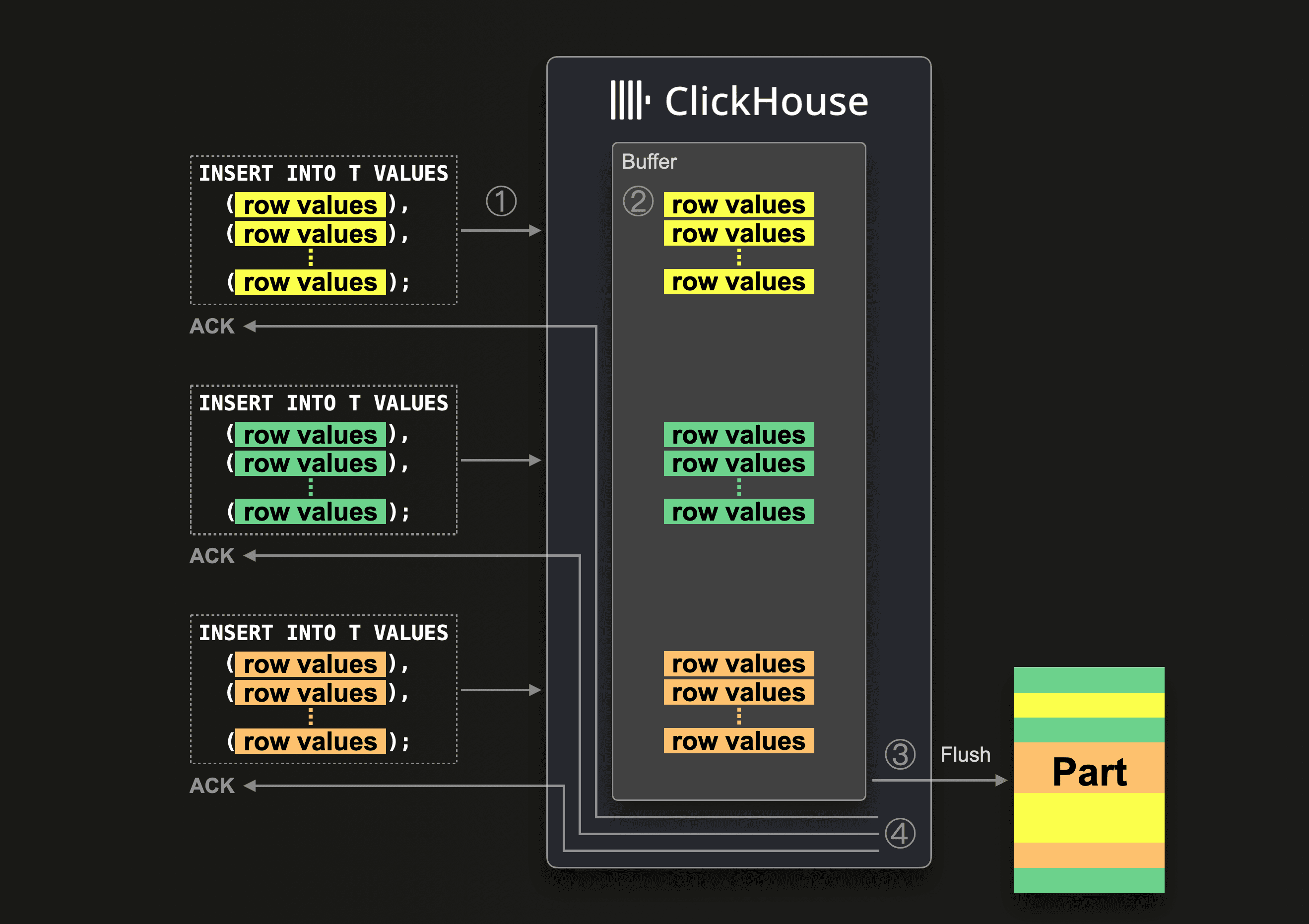
Data is not written to the table file-by-file. Instead, ClickHouse writes data in immutable parts.
A “part” is like a directory containing column files + metadata:
/table/
   part_1/
   part_2/
   part_3/
Each part corresponds to a chunk of inserted data (usually tens or hundreds of MB).
Why immutable?
Avoids locking
Makes ingestion extremely fast
Merges later handle compaction
3. Granules (Blocks of Rows)
Inside each part, data is logically divided into granules, typically containing 8192 rows (default).
For each granule, ClickHouse writes:
Column values (compressed)
Index marks pointing where the granule starts
Granule sizes keep index small and predictable.
4. How Column Files Are Stored
For every column, ClickHouse creates two important files:
<column>.binActual compressed column values stored granule-by-granule
<column>.mrk2“Mark” file containing offsets to quickly jump into the
.bin
Example for column “amount”:
amount.bin    → compressed column data
amount.mrk2   → pointers to start of each granule
These marks let ClickHouse skip huge portions of data during queries.
5. Primary Index (Sparse Index)
ClickHouse does NOT store a traditional B-tree index.
Instead it stores a sparse index per part:
one index entry per granule.
Example (primary key = user_id):
Granule 1 → min user_id: 100
Granule 2 → min user_id: 150
Granule 3 → min user_id: 200
...
This index is small and always kept in memory.
Result:
Query engine can skip reading most granules because it knows which ranges contain your data.
6. Compression
ClickHouse compresses data column by column inside .bin files.
Compression algorithms may include:
LZ4 (default)
ZSTD
Delta/gorilla for time series
DoubleDelta
LowCardinality encoding
Compression is highly efficient because:
Same type of values stored together (columnar)
Granules allow local compression optimization
7. Data Merge Process (MergeTree Family)
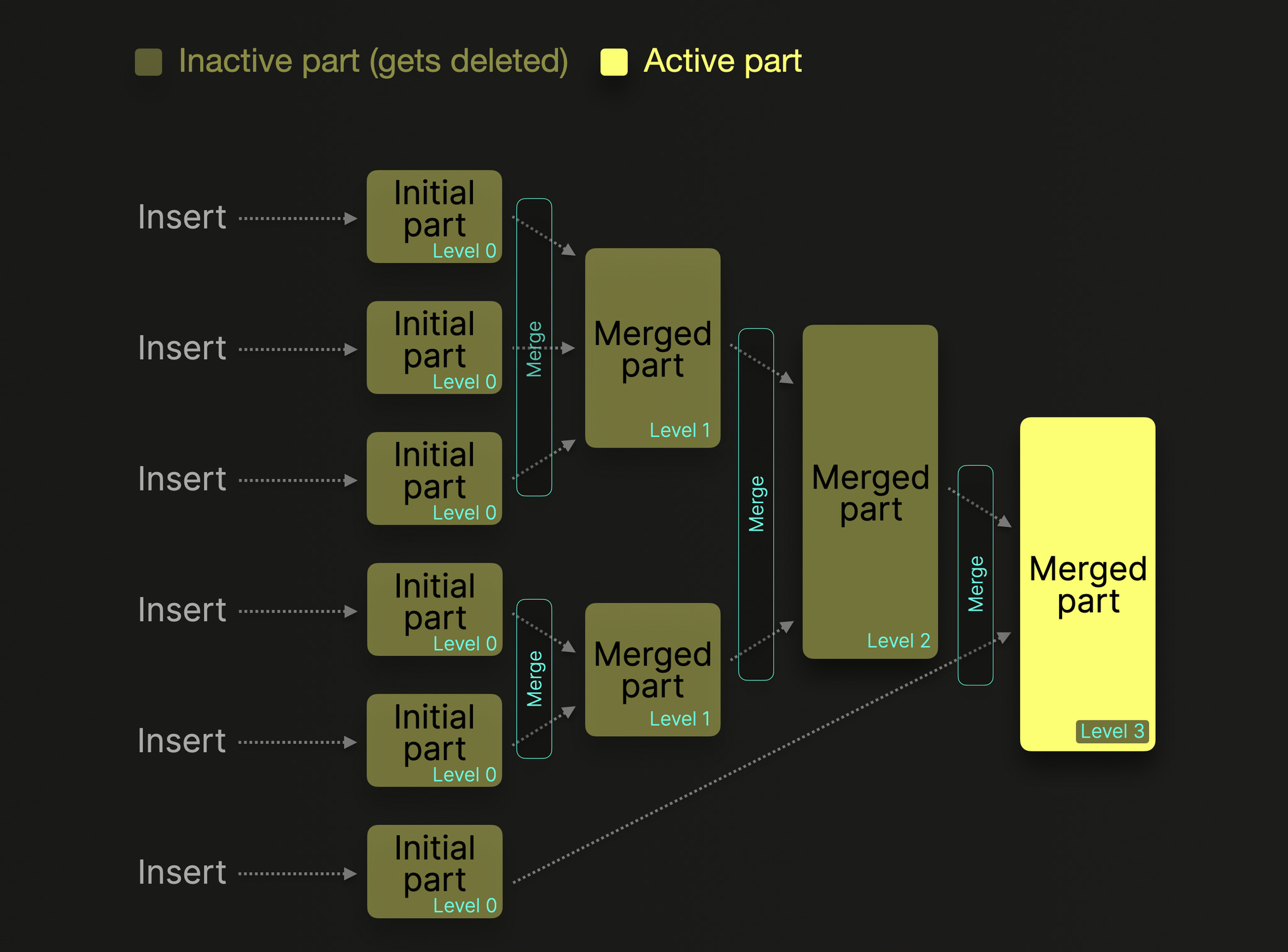
When new parts are written, ClickHouse later merges them in the background:
Sorts rows by primary key
Removes duplicates if needed (ReplacingMergeTree)
Aggregates if needed (AggregatingMergeTree)
Compacts small parts into big parts
This is similar to LSM-tree compaction but columnar.
Merging preserves:
Sorted order
Index marks
Compressed column structure
8. Table Engines and Variations
MergeTree (base engine)
Most tables use one of the MergeTree engines, which implement all the above.
9. On-Disk Directory Layout
A typical part directory looks like:
part_20251205_1_1_0/
    columns.txt
    data_checksums.txt
    metadata_version.txt
    primary.idx
    count.txt
    id.bin
    id.mrk2
    amount.bin
    amount.mrk2
    name.bin
    name.mrk2
Important files:
primary.idx → sparse primary index (in memory too)
columns.txt → schema info
checksums.txt → integrity
10. How a Query Reads Data
Process:
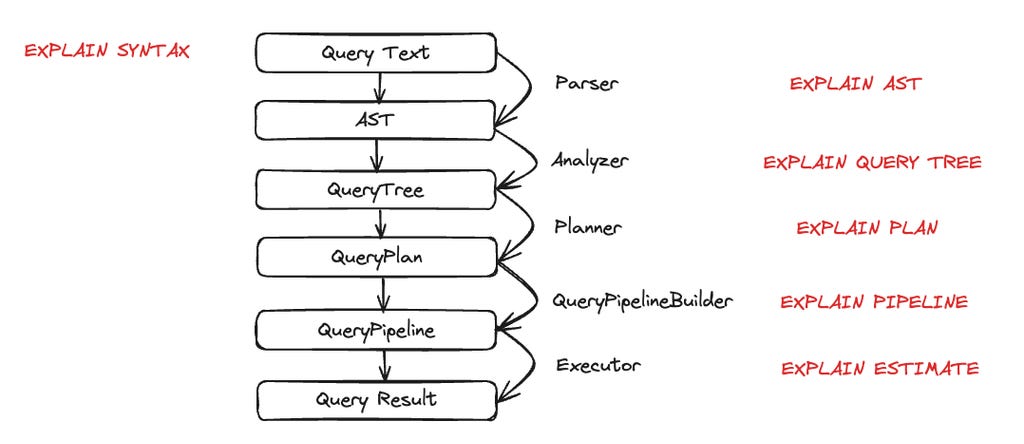
Query parser → identifies columns and filters
Using primary index, engine finds which granules to read
Reads only necessary columns and granules
Decompresses data stream-by-stream
Applies predicate pushdown and vectorized execution
This avoids full table scans.
11. Why It Is Extremely Fast
ClickHouse’s storage design gives several advantages:
Columnar data minimizes I/O
Sparse index avoids scanning entire dataset
Granules allow skipping big data ranges
Compression drastically reduces disk size and speeds up reads
Parts are immutable → fast writes, no locking
Merge operations maintain optimal read performance
How Clickhouse Computes Average for 1B rows?
CREATE TABLE flights
(
    flight_date  Date,
    route_id     UInt32,
    passengers   UInt16,
    aircraft     String
)
ENGINE = MergeTree
PARTITION BY toYYYYMM(flight_date)
ORDER BY (flight_date, route_id);
And you run this query on a table with 1 billion rows:
SELECT avg(passengers)
FROM flights
WHERE flight_date BETWEEN ‘2025-01-01’ AND ‘2025-01-31’;
1. Planner sees what it really needs
From the query, ClickHouse figures out:
Only one column is actually needed for the final calculation:
passengersflight_dateis needed only to filter, not to returnroute_idandaircraftare not needed at all
So from 4 columns, it will only read:
flight_date(for filtering using index)passengers(for the aggregation)
Everything else is ignored at the storage level.
2. Use primary index to find which data to touch
Recall: the table is ORDER BY (flight_date, route_id).
ClickHouse maintains a sparse primary index per part with entries like:
Granule 1: min (flight_date, route_id) = (2024-12-30, 10)
Granule 2: min (flight_date, route_id) = (2024-12-31, 5)
Granule 3: min (flight_date, route_id) = (2025-01-01, 1)
Granule 4: min (flight_date, route_id) = (2025-01-01, 100)
...
Granule N: min (flight_date, route_id) = (2025-02-10, 3)
Each granule is ~8192 rows.
For the predicate:
flight_date BETWEEN ‘2025-01-01’ AND ‘2025-01-31’
ClickHouse:
Loads the primary index for all relevant parts into memory (it’s small).
Binary searches to find which granules might contain rows where
flight_dateis in that range.Produces a list of granules to read; everything outside that range is skipped.
If only, say, 200 million of the 1 billion rows are in January 2025:
It will only touch the granules overlapping January.
The other 800 million rows’ granules are never read from disk.
3. Use marks to jump into the column files
For each part, and each column, you have:
flight_date.bin,flight_date.mrk2passengers.bin,passengers.mrk2
The .mrk2 “marks” file tells ClickHouse:
At what byte offset in
.bineach granule startsSome additional info (like offsets in compressed blocks)
So for the list of granules identified in step 2, ClickHouse:
Uses
flight_date.mrk2to jump to just those ranges inflight_date.binUses
passengers.mrk2to jump to the matching ranges inpassengers.bin
No scanning from the beginning; it’s direct seeks → sequential reads of only needed blocks.
4. Reading data in blocks, not row-by-row
ClickHouse does vectorized processing.
Rough picture:
It reads a chunk of, say, 65,536 rows from
flight_dateandpassengersIn memory, that looks like:
flight_date[]   = [2025-01-01, 2025-01-01, 2025-01-01, ...]
passengers[]    = [120, 80, 150, 90, ...]
Each column is a contiguous array.
5. Apply the filter
The WHERE clause is applied to the block array-wise:
Evaluate
flight_date BETWEEN ‘2025-01-01’ AND ‘2025-01-31’for all rows in the blockThis results in a boolean mask (e.g.
[true, true, false, true, ...])Use this mask to filter
passengers[]to a smaller array, e.g.:
passengers_filtered[] = [120, 80, 90, ...]
This is all done with tight loops on arrays, using CPU cache efficiently.
6. Partial aggregation per block
For avg(passengers), ClickHouse does not keep all values in memory.
For each block:
Compute:
partial_sum += sum(passengers_filtered[])partial_count += len(passengers_filtered[])
So imagine across all blocks in all parts that match January:
Block 1 (e.g. 40k matching rows) → sum1, count1
Block 2 → sum2, count2
...
Block M → sumM, countM
ClickHouse accumulates:
global_sum   = sum1 + sum2 + ... + sumM
global_count = count1 + count2 + ... + countM
It never stores 1 billion values in RAM.
Just these two running numbers: global_sum, global_count.
7. Final aggregation step
At the end, the final aggregation is trivial:
avg_passengers = global_sum / global_count
This might be something like:
global_sum = 18,000,000,000(total passengers across all matching rows)global_count = 200,000,000(total rows in January)
Result:
avg_passengers = 18,000,000,000 / 200,000,000 = 90
8. Parallelism across CPU cores
All of the above is parallelized:
Data parts are split across threads
Within a part, ranges of marks (granules) are split too
Each thread reads its own set of granules, computes partial
(sum, count)
At the end, ClickHouse merges the partial aggregates from all threads:
global_sum   = sum(global_sum_thread_i)
global_count = sum(global_count_thread_i)
avg          = global_sum / global_count
So for 1 billion rows on an 8-core machine, you’ll see multiple threads concurrently:
doing I/O
decompressing column chunks
applying filters
computing partial sums and counts
9. What if there is no WHERE clause?
If you do:
SELECT avg(passengers) FROM flights;
Then:
Primary index / partition pruning cannot skip anything
ClickHouse will read all 1 billion
passengersvalues frompassengers.binBut still:
Only that one column is read
It’s compressed and read in large chunks
Aggregation still only keeps
sumandcountin memory
So cost is dominated by:
Disk I/O for reading
passengers.binCPU for decompression and summation
No sorting, no joins, no extra allocations.
10. Why this is efficient even for 1 billion rows
Key reasons:
Columnar storage
Onlypassengers(and maybeflight_date) is read. Not full rows.Sparse primary index + marks
If you have a filter onflight_dateor any prefix ofORDER BYkey, large portions of 1B rows are skipped outright.Compression
passengersis numeric and compresses well. Less disk I/O → faster scan.Vectorized engine
Work is done on arrays of thousands of values at once, not one row at a time.Streaming aggregation
Memory usage is O(1) w.r.t number of rows for simple aggregates likeavg:
only sum and count are kept.
Example Scenario
Imagine you have this ClickHouse table:
CREATE TABLE flights
(
    flight_date  Date,
    route_id     UInt32,
    passengers   UInt16,
    aircraft     String
)
ENGINE = MergeTree
PARTITION BY toYYYYMM(flight_date)
ORDER BY (flight_date, route_id);
And you run this query on a table with 1 billion rows:
SELECT avg(passengers)
FROM flights
WHERE flight_date BETWEEN ‘2025-01-01’ AND ‘2025-01-31’;
1. Planner sees what it really needs
From the query, ClickHouse figures out:
Only one column is actually needed for the final calculation:
passengersflight_dateis needed only to filter, not to returnroute_idandaircraftare not needed at all
So from 4 columns, it will only read:
flight_date(for filtering using index)passengers(for the aggregation)
Everything else is ignored at the storage level.
2. Use primary index to find which data to touch
Recall: the table is ORDER BY (flight_date, route_id).
ClickHouse maintains a sparse primary index per part with entries like:
Granule 1: min (flight_date, route_id) = (2024-12-30, 10)
Granule 2: min (flight_date, route_id) = (2024-12-31, 5)
Granule 3: min (flight_date, route_id) = (2025-01-01, 1)
Granule 4: min (flight_date, route_id) = (2025-01-01, 100)
...
Granule N: min (flight_date, route_id) = (2025-02-10, 3)
Each granule is ~8192 rows.
For the predicate:
flight_date BETWEEN ‘2025-01-01’ AND ‘2025-01-31’
ClickHouse:
Loads the primary index for all relevant parts into memory (it’s small).
Binary searches to find which granules might contain rows where
flight_dateis in that range.Produces a list of granules to read; everything outside that range is skipped.
If only, say, 200 million of the 1 billion rows are in January 2025:
It will only touch the granules overlapping January.
The other 800 million rows’ granules are never read from disk.
3. Use marks to jump into the column files
For each part, and each column, you have:
flight_date.bin,flight_date.mrk2passengers.bin,passengers.mrk2
The .mrk2 “marks” file tells ClickHouse:
At what byte offset in
.bineach granule startsSome additional info (like offsets in compressed blocks)
So for the list of granules identified in step 2, ClickHouse:
Uses
flight_date.mrk2to jump to just those ranges inflight_date.binUses
passengers.mrk2to jump to the matching ranges inpassengers.bin
No scanning from the beginning; it’s direct seeks → sequential reads of only needed blocks.
4. Reading data in blocks, not row-by-row
ClickHouse does vectorized processing.
Rough picture:
It reads a chunk of, say, 65,536 rows from
flight_dateandpassengersIn memory, that looks like:
flight_date[]   = [2025-01-01, 2025-01-01, 2025-01-01, ...]
passengers[]    = [120, 80, 150, 90, ...]
Each column is a contiguous array.
5. Apply the filter
The WHERE clause is applied to the block array-wise:
Evaluate
flight_date BETWEEN ‘2025-01-01’ AND ‘2025-01-31’for all rows in the blockThis results in a boolean mask (e.g.
[true, true, false, true, ...])Use this mask to filter
passengers[]to a smaller array, e.g.:
passengers_filtered[] = [120, 80, 90, ...]
This is all done with tight loops on arrays, using CPU cache efficiently.
6. Partial aggregation per block
For avg(passengers), ClickHouse does not keep all values in memory.
For each block:
Compute:
partial_sum += sum(passengers_filtered[])partial_count += len(passengers_filtered[])
So imagine across all blocks in all parts that match January:
Block 1 (e.g. 40k matching rows) → sum1, count1
Block 2 → sum2, count2
...
Block M → sumM, countM
ClickHouse accumulates:
global_sum   = sum1 + sum2 + ... + sumM
global_count = count1 + count2 + ... + countM
It never stores 1 billion values in RAM.
Just these two running numbers: global_sum, global_count.
7. Final aggregation step
At the end, the final aggregation is trivial:
avg_passengers = global_sum / global_count
This might be something like:
global_sum = 18,000,000,000(total passengers across all matching rows)global_count = 200,000,000(total rows in January)
Result:
avg_passengers = 18,000,000,000 / 200,000,000 = 90
8. Parallelism across CPU cores
All of the above is parallelized:
Data parts are split across threads
Within a part, ranges of marks (granules) are split too
Each thread reads its own set of granules, computes partial
(sum, count)
At the end, ClickHouse merges the partial aggregates from all threads:
global_sum   = sum(global_sum_thread_i)
global_count = sum(global_count_thread_i)
avg          = global_sum / global_count
So for 1 billion rows on an 8-core machine, you’ll see multiple threads concurrently:
doing I/O
decompressing column chunks
applying filters
computing partial sums and counts
9. What if there is no WHERE clause?
If you do:
SELECT avg(passengers) FROM flights;
Then:
Primary index / partition pruning cannot skip anything
ClickHouse will read all 1 billion
passengersvalues frompassengers.binBut still:
Only that one column is read
It’s compressed and read in large chunks
Aggregation still only keeps
sumandcountin memory
So cost is dominated by:
Disk I/O for reading
passengers.binCPU for decompression and summation
No sorting, no joins, no extra allocations.
10. Why this is efficient even for 1 billion rows
Key reasons:
Columnar storage
Onlypassengers(and maybeflight_date) is read. Not full rows.Sparse primary index + marks
If you have a filter onflight_dateor any prefix ofORDER BYkey, large portions of 1B rows are skipped outright.Compression
passengersis numeric and compresses well. Less disk I/O → faster scan.Vectorized engine
Work is done on arrays of thousands of values at once, not one row at a time.Streaming aggregation
Memory usage is O(1) w.r.t number of rows for simple aggregates likeavg:
only sum and count are kept.
Numerical Example to understand idx vs .mk2
1. Tiny table recap (20 rows, granule size = 5)
Table:
CREATE TABLE flights
(
    flight_date Date,
    passengers  UInt16
)
ENGINE = MergeTree
ORDER BY (flight_date);
Data (same as before):
Row | flight_date   | passengers
----+---------------+-----------
 1  | 2025-01-01    | 100
 2  | 2025-01-01    | 120
 3  | 2025-01-01    | 80
 4  | 2025-01-01    | 150
 5  | 2025-01-02    | 200
 6  | 2025-01-01    | 90
 7  | 2025-01-03    | 110
 8  | 2025-01-01    | 130
 9  | 2025-01-01    | 140
10  | 2025-01-01    | 70
11  | 2025-01-04    | 160
12  | 2025-01-01    | 95
13  | 2025-01-01    | 85
14  | 2025-01-01    | 105
15  | 2025-01-01    | 115
16  | 2025-01-05    | 175
17  | 2025-01-01    | 125
18  | 2025-01-01    | 135
19  | 2025-01-02    | 180
20  | 2025-01-01    | 155
Granule size = 5 ⇒
Granule 0: rows 1–5
Granule 1: rows 6–10
Granule 2: rows 11–15
Granule 3: rows 16–20
One part on disk might look like:
part_1_1_0/
  primary.idx
  flight_date.bin
  flight_date.mrk2
  passengers.bin
  passengers.mrk2
  ...
Now, let’s zoom into primary.idx and passengers.mrk2.
2. primary.idx – sparse primary index
For ORDER BY (flight_date), ClickHouse stores a sparse index with 1 entry per granule.
Conceptually, primary.idx for this part might hold:
Granule First row in granule Min flight_date in granule 0 Row 1 2025-01-01 1 Row 6 2025-01-01 2 Row 11 2025-01-01 3 Row 16 2025-01-01
On disk it’s stored in a compact binary format, but conceptually it’s just an array of key values, one per granule, ordered by granule.
Key idea:
Index entry i corresponds to granule i.
For multi-column primary keys
(date, route_id), the entry would be a tuple(min_date, min_route_id)for that granule.
How it’s used for our query
Query:
SELECT avg(passengers)
FROM flights
WHERE flight_date = ‘2025-01-01’;
ClickHouse:
Loads
primary.idxinto memory (very small).Binary searches it for first and last granule where
flight_datemight be‘2025-01-01’.
In this toy data, all granules’ min key is 2025-01-01, so it will consider granules 0–3 as candidates.
If some granules had min date 2025-01-10 and we filter date = ‘2025-01-01’, those would be skipped early, before touching any column files.
But primary.idx only tells which granules to read, not where in the data files they start. That’s where .mrk2 comes in.
3. <column>.mrk2 – marks file for that column
Each column has:
<column>.bin→ actual compressed values for all granules<column>.mrk2→ “marks”: where each granule’s data starts in.bin
Let’s focus on passengers.
3.1 Assume some compressed sizes
Suppose when ClickHouse wrote the data, it compressed per granule, resulting in:
Granule 0 (rows 1–5): compressed size = 40 bytes
Granule 1 (rows 6–10): compressed size = 36 bytes
Granule 2 (rows 11–15): compressed size = 44 bytes
Granule 3 (rows 16–20): compressed size = 32 bytes
Then passengers.bin is basically:
Byte offsets (conceptually)

0         40      76      120     152
|---------|-------|-------|-------|
   G0        G1      G2      G3
G0 = granule 0, etc.
So the starting offset of each granule is:
G0: 0
G1: 40
G2: 76
G3: 120
3.2 What passengers.mrk2 conceptually contains
For each granule, passengers.mrk2 stores the offset to use for seeking into passengers.bin (and some extra info like offset within decompressed block).
Simplified conceptual view of passengers.mrk2:
Granule Offset in passengers.bin 0 0 1 40 2 76 3 120
On disk, it’s not a text file like this; it’s a binary array of numbers. But logically it is:
G0 → 0
G1 → 40
G2 → 76
G3 → 120
Real mrk2 entries are tuples like:
(offset_in_compressed_file, offset_in_decompressed_block)
plus positions for additional “streams” (e.g. for complex types)
But for intuition, think of it as: “for granule i, start reading from byte X in <column>.bin”.
4. Putting it together: primary.idx + mrk2 + .bin
Now let’s re-run the query and walk through the chain:
SELECT avg(passengers)
FROM flights
WHERE flight_date = ‘2025-01-01’;
Step 1: Use primary.idx to pick granules
From primary.idx:
Granule Min date 0 2025-01-01 1 2025-01-01 2 2025-01-01 3 2025-01-01
Predicate: flight_date = ‘2025-01-01’
Result: All granules 0–3 may contain matching rows → they’re candidates.
(If we had a query for a date outside the data, we’d find 0 candidate granules and be done.)
Step 2: For each candidate granule, use .mrk2 to seek
Now for each of those granules, ClickHouse does:
Looks up
flight_date.mrk2to know where granule i’s dates start inflight_date.bin.Looks up
passengers.mrk2to know where granule i’s passengers start inpassengers.bin.
For passengers based on our fake offsets:
Granule Mark entry Meaning 0 0 Seek to byte 0 in passengers.bin 1 40 Seek to byte 40 2 76 Seek to byte 76 3 120 Seek to byte 120
So to read granule 2’s passengers:
Seek to byte 76 in
passengers.binRead enough bytes to cover G2 (we know how many rows and compressed size)
Decompress into an in-memory array of 5 values:
[160, 95, 85, 105, 115]
Same thing for flight_date.
Step 3: In-memory filtering and aggregation
For each granule:
In memory: arrays for
flight_date[]andpassengers[](5 elements each here)Apply filter
flight_date == ‘2025-01-01’→ build maskUse mask to filter
passengers[]Compute partial sum and partial count
Example: granule 2
flight_date[]→[2025-01-04, 2025-01-01, 2025-01-01, 2025-01-01, 2025-01-01]passengers[]→[160, 95, 85, 105, 115]Mask:
[false, true, true, true, true]Filtered passengers:
[95, 85, 105, 115]Partial sum = 400, partial count = 4
Add to global sum/count, as we did earlier.
Does Clickhouse Store all Data in RAM?
ClickHouse stores .bin files on disk, not in RAM.
But—it reads them through the OS page cache, which can make them feel like they’re in memory without ClickHouse explicitly storing them there.
1. .bin Files Live on Disk
Every part of a MergeTree table is stored on the filesystem:
/var/lib/clickhouse/data/<db>/<table>/<part>/
   passengers.bin
   passengers.mrk2
   flight_date.bin
   flight_date.mrk2
   primary.idx
All .bin files are persistent disk files.
ClickHouse does not load:
whole
.binfileswhole columns
whole parts
into RAM by default.
This is intentional—ClickHouse is designed to work with datasets far bigger than memory.
2. Only Requested Granules Are Read Into RAM
When you query:
SELECT avg(passengers)
FROM flights
WHERE flight_date = ‘2025-01-01’;
ClickHouse:
Uses the primary index → determine which granules to read
Uses
.mrk2→ jump to exact byte offsets in.binReads only that portion of the
.binfile into memoryDecompresses it into column vectors
Processes it
Frees the memory after the block is processed
So ClickHouse’s memory footprint during a scan is:
A few MB per thread
Not the full column
Not the full table
This is why ClickHouse can run on machines with 16GB RAM and query TB-scale tables.
3. OS Page Cache Caches Hot .bin Data (Not ClickHouse)
Linux automatically caches recently-read portions of files in the filesystem cache.
Important:
This is not ClickHouse RAM usage
It is not counted against ClickHouse’s memory limits
It allows re-reading parts of
.binfiles without extra disk I/O
Example:
Query 1:
Reads granules 1000–2000 from
passengers.binOS caches those 40 MB
Query 2:
Reads same granules again
Data is served from RAM (page cache)
No disk read needed
But ClickHouse is not holding the data. The operating system is.
4. What is stored in RAM permanently?
ClickHouse does store these in RAM:
1. primary.idx
Always loaded for active parts; very small (1 value per granule).
2. Table metadata
Schemas, column types.
3. Query execution buffers
Compressed + decompressed blocks for each thread.
4. Aggregation state
Example: sum/count for avg().
But NOT entire .bin files.
5. Why ClickHouse Avoids Storing Columns in RAM
Storing .bin in RAM would:
Waste memory when queries need only a few granules
Prevent scaling beyond RAM
Interfere with Linux’s page cache (which already does this well)
Instead, ClickHouse streams data:
Reads a compressed block
Processes it
Drops it
Moves to next block
This streaming behavior is extremely memory-efficient.
How does Updates and Deletes work with MergeTree?
Key Idea
Normal MergeTree does NOT track latest versions automatically.
But it can handle updates and deletes using something called a mutation.
A mutation:
does NOT rewrite old parts
creates new mutation parts
merges old parts + mutation parts into new compacted parts
old versions disappear after merge is done
This gives the illusion of updates, but internally everything is append-only + merge.
Small Example (Normal MergeTree Only)
We create a simple table:
CREATE TABLE users
(
    id UInt32,
    name String
)
ENGINE = MergeTree()
ORDER BY id;
At first, the table is empty.
Step 1. Insert initial data (creates Part A)
INSERT INTO users VALUES (1, ‘Alice’), (2, ‘Bob’);
Now on disk:
Part A:
  rows:
    (1, ‘Alice’)
    (2, ‘Bob’)
Parts are immutable, so this stays unchanged.
Step 2. Issue an UPDATE mutation
Suppose we run:
ALTER TABLE users UPDATE name = ‘Alice_Updated’ WHERE id = 1;
Important:
This does NOT modify Part A.
It creates a mutation entry that says essentially:
For id = 1, set name = ‘Alice_Updated’
ClickHouse writes this into a temporary mutation log.
Background merge threads will apply it later.
Step 3. Background merge applies mutation
Some time later, a background merge happens:
Input:
Old Part A
Mutation instruction
Merge logic:
Read rows from Part A
If row matches mutation condition (id = 1), rewrite the column
Write new data into a new part (Part B)
Result:
Part B (new merged part):
    (1, ‘Alice_Updated’)
    (2, ‘Bob’)
Once the merge finishes:
Part A is deleted
Mutation log entry is marked complete
Only Part B remains
Now the table truly contains the updated row.
Step 4. Why does this look like an update?
Because after the merge is finished:
Old part (Part A) is gone
Only new part (Part B) exists
Queries see the updated data
But remember:
Actual update did NOT modify Part A
It created a brand new Part B with corrected values
MergeTree = immutable parts + merge-based rewrite.
Step 5. What happens if you query before merge is done?
If you query right after submitting:
ALTER TABLE users UPDATE ...
but before merge finishes, ClickHouse:
Reads Part A
Applies mutation “patch” on the fly
Gives you correct latest values
But the disk still contains old Part A until merge completes.
So logically:
You see updated value immediately
Storage updates later
Step 6. What happens for DELETE?
ALTER TABLE users DELETE WHERE id = 2;
Same process:
The Delete mutation is accepted
Background merge creates a new compacted part that excludes row id=2
Old part is removed
Query sees correct results immediately due to mutation mask
In a normal MergeTree, “tracking the latest version” is done by:
Keeping old rows in old immutable parts
Writing mutation instructions
Using merges to produce a new part containing the updated data
Removing the old parts afterward
This is how ClickHouse provides update/delete semantics without ever modifying data files in-place.
How are granules and mk2 files constructed back after an update/delete operation?
We want to understand:
If we update
WHERE id = 1, does the rewritten row go back into the same granule (id=1 to id=5), or can it end up somewhere else?
Short Answer
When a mutation is applied and the new part is created:
Rows are fully resorted by the ORDER BY key.
Therefore:
The updated row will be placed in the correct sorted position,
Which means it ends up in the granule corresponding to its sorted order,
Not necessarily the same granule as before (though in practice usually the same).
The rule is simple:
Granules are determined fresh when the new merged part is written.
Granules are not tied to the old parts. They are reconstructed during merge.
Now let’s walk through a tiny example
Table:
CREATE TABLE users
(
    id UInt32,
    name String
)
ENGINE = MergeTree()
ORDER BY id;
Assume granule size = 5 rows for simplicity.
Initial data:
Part A:
id: 1, 2, 3, 4, 5
name: A, B, C, D, E

Granules:
G0 = rows id 1–5
Now we update:
ALTER TABLE users UPDATE name = ‘A_new’ WHERE id = 1;
What ClickHouse does during merge
During the merge that applies the mutation:
It reads all rows of Part A
It applies update logic
It sorts them again by ORDER BY id
It writes a completely new part (Part B)
Granules are formed from scratch:
Part B:
id: 1, 2, 3, 4, 5
name: A_new, B, C, D, E
Granules in Part B:
G0 = rows id 1–5 (same rows)
Because ORDER BY id determines the sorted layout, and that never changed.
So yes, in this example the updated row ends up in the same granule, because:
It has the same id
ORDER BY still sorts rows the same way
Granules are simply 5-row chunks of sorted output
But this is not because granules are preserved; it is because sorted order did not change.
When would an updated row end up in a different granule?
Whenever the updated row’s position in the sorted key space changes.
Example:
Let’s say ORDER BY = (name) instead of (id).
Initial:
(name sorted)
A, B, C, D, E

Granule 0 = A, B, C, D, E
Now update:
UPDATE users SET name = ‘ZZZ’ WHERE id = 1;
During merge:
Sorted rows by name:
B, C, D, E, ZZZ
Granules now:
G0 = B, C, D, E, ZZZ
So the updated row moves to the end.
Meaning:
Updated rows may move to entirely different granules if their ORDER BY position changes.
Very important clarification
Granules are not preserved between merges.
A merge creates a completely new part:
new
.binfilesnew
.mrk2marksnew granule boundaries
new primary index
Granules are NOT copied from old parts; they are regenerated.
So after every merge, granules for a given part may:
shift
be combined
be split
align differently
As long as the final part preserves the sorted ORDER BY layout.
Does an updated row end up in the same granule?
Usually yes, if:
The ORDER BY key did not change
And you updated only a non-key column
For example updating name while ORDER BY (id) means the row stays near the same position, so it ends up in the same granule.
But:
It can end up in a completely different granule if the ORDER BY key changes.
Because:
MergeTree recreates parts during merges
Rows are fully resorted
Granules are rebuilt from scratch
Granules depend solely on sorted order, not on history
Performance Tuning in Clickhouse
Compression Codecs Overview
Codec Compression Speed Decompression Speed Compression Ratio Best For Notes LZ4 (default) Very fast Very fast Medium General numeric + string columns Default codec; best all-round choice LZ4HC Slow Fast Better than LZ4 Historical or rarely updated data Same format as LZ4 but tighter compression ZSTD (levels 1–22) Slow → Very slow (higher level) Fast High → Very high Logs, large strings, archival data Best ratio overall; level 1–6 practical for most Delta Fast Fast Medium–High (on sorted ints) Sorted integers, monotonic counters Encodes differences between consecutive values DoubleDelta Fast Fast High (monotonic) Timestamps, smoothly increasing numeric series Computes delta of deltas → highly efficient Gorilla Medium Medium Very high for similar consecutive floats Time series metrics (Float32/64) Best for small fluctuation numeric values T64 (Tunstall coding) Medium Medium Medium–High Low-entropy numeric data Rare but useful for repetitive patterns LowCardinality (dictionary encoding) Fast Fast Very high when cardinality is low Status fields, categorical strings Not a codec itself, but reduces storage and speeds joins/aggregations; combine with ZSTD or LZ4
Recommendations per Use Case
Data Type Recommended Codec Why Numeric values (generic) LZ4 Fast, safe default High-frequency timestamps DoubleDelta Encodes timestamps efficiently Monotonic counters Delta / DoubleDelta Deltas compress extremely well Floating-point time series Gorilla Best for metric-style data Text/log messages ZSTD(1–6) Highest compression ratio Large JSON strings ZSTD(3+) Better for complex structured text Low-cardinality strings LowCardinality + ZSTD Minimizes memory + disk footprint Archived cold data ZSTD(6–12) Space savings outweigh CPU costs Hot frequently-read data LZ4 or ZSTD(1) Minimize CPU overhead
Why use Delta and Double Delta Codecs?
Think of numbers like moments on a timeline
Example timestamps:
1000, 1005, 1010, 1015, 1020
These numbers look big — ClickHouse wants to compress them.
But the differences between them are tiny:
+5, +5, +5, +5
Storing big numbers is expensive.
Storing small numbers is cheap.
That is why Delta exists.
1. What is DELTA in the simplest terms?
Delta = store how much the value changed, not the value itself.
Example:
1000 → store 1000
1005 → store +5
1010 → store +5
1015 → store +5
1020 → store +5
Instead of storing:
1000, 1005, 1010, 1015, 1020
Store:
1000, 5, 5, 5, 5
Why it works:
All those 5’s compress extremely well
Much smaller file size
Delta is simply: “value[i] - value[i-1]”.
2. What is DOUBLED DELTA?
Delta looked at the difference between values.
DoubleDelta looks at the difference between the differences.
Why?
Because sometimes even the delta is always the same.
Example:
Deltas: 5, 5, 5, 5
Difference between these:
0, 0, 0
So DoubleDelta stores:
1000, 5, 0, 0, 0
Which compresses even better than Delta.
3. Why DoubleDelta works
Think of data like timestamps:
Every row happens 5 seconds after the previous one.
That means:
First value is big
Difference is small
Difference of difference is zero
Zeros compress like nothing — nearly free space.
4. Let’s visualize it very simply
Original timestamps:
1000 1005 1010 1015 1020
Delta representation:
1000, 5, 5, 5, 5
DoubleDelta representation:
1000, 5, 0, 0, 0
That is literally it.
Delta: numbers become small
DoubleDelta: numbers become even smaller (mostly zeros)
5. When to use which?
Use Delta when:
Values go up, but not evenly.
Example:
1000, 1007, 1019, 1021, 1100
Differences are irregular, so DoubleDelta doesn’t help much.
Use DoubleDelta when:
Values increase evenly (or almost evenly).
Example:
1000, 1005, 1010, 1015, 1020
Perfect case: timestamps at fixed intervals.
Delta → store “how much did it change?”
DoubleDelta → store “how much did the change change?”
If the change is stable → zeros → amazing compression.
Materialized Views in Clickhouse
1. First: What a normal table is
A table in ClickHouse:
Stores your data directly
You insert rows into it
You query those rows
Data lives physically inside MergeTree parts
Nothing happens automatically when new data arrives (unless you tell ClickHouse via a view)
Example:
CREATE TABLE events (
    id UInt32,
    ts DateTime,
    value Float32
) ENGINE = MergeTree() ORDER BY ts;
This table is just a storage container.
2. What is a Materialized View?
A Materialized View (MV) in ClickHouse is:
A query that runs automatically whenever data is inserted into another table
The result of that query is physically stored in a target table
The MV is not a table you insert into directly
Instead → it listens to inserts on a source table
And writes transformed/aggregated data into a destination table
A MV = trigger + pipeline + target table
You do not store anything in an MV itself — it writes to a real table.
3. Important: Materialized Views are not virtual
In many databases (Postgres, Oracle), a materialized view is a “cached query”.
In ClickHouse:
A Materialized View is NOT a cached query
A Materialized View is NOT a table you query directly (although you CAN query the target table)
A Materialized View is more like a continuous ingestion rule
Think of it as:
Whenever new data is inserted into table A, run query X and store output in table B.
4. Architecture of a Materialized View
A ClickHouse MV always has:
1) A source table
The table you insert into.
2) A SELECT query (the transformation logic)
3) A target table
Where the MV writes the transformed data.
So the MV is basically the wiring between source and target.
5. A simple example
Source table:
CREATE TABLE events
(
    user_id UInt32,
    amount Float32,
    ts DateTime
)
ENGINE = MergeTree()
ORDER BY ts;
Target aggregated table:
CREATE TABLE daily_totals
(
    date Date,
    user_id UInt32,
    total_amount Float64
)
ENGINE = SummingMergeTree()
ORDER BY (date, user_id);
Materialized view:
CREATE MATERIALIZED VIEW mv_daily
TO daily_totals
AS
SELECT
    toDate(ts) AS date,
    user_id,
    sum(amount) AS total_amount
FROM events
GROUP BY date, user_id;
What happens:
You insert into
eventsMV immediately reads the inserted block
Computes sums per day per user
Writes aggregated rows into
daily_totals
You never insert directly into daily_totals.
You never query the view; you query daily_totals.
6. How Materialized Views differ from tables
Feature Table Materialized View Stores data? Yes No (stores into another table) Insert into? Yes No — inserts happen automatically from source table Triggered by inserts? No Yes Has a SELECT query inside? No Yes Used for transformations? No Yes Used for pre-aggregation / rollups? No Yes Uses its own storage engine? No The target table does Queryable directly? Yes Usually no (you query the target table)
The MV itself is metadata + logic.
The actual data lives in the target table.
7. Why Materialized Views are extremely useful
1. Pre-aggregation
Like daily, hourly, or minute-level rollups.
Huge performance boost for dashboards.
2. ETL pipelines
Materialized views act as stream processors inside ClickHouse.
3. Data duplication with transformation
Like storing same data partitioned differently or sorted differently.
4. Automatic projections before projections existed
Materialized views were the ClickHouse way to optimize queries before projections came.
8. Do Materialized Views read entire tables?
No.
They read only the newly inserted blocks in the source table.
This makes them efficient and ideal for streaming/real-time processing.
9. What happens if you drop a Materialized View?
The target table remains
Future inserts stop populating it
Nothing breaks
Materialized views are loosely coupled.
10. Are Materialized Views updated when source data is mutated?
No, not automatically.
If you:
ALTER TABLE events UPDATE ...
the MV does not re-process old rows.
To handle updates correctly, you must:
avoid updates, OR
use engines that merge correctly, like ReplacingMergeTree, OR
rebuild the MV manually.
Materialized views are optimized for append-only pipelines.
A Short TL;DR
A table is a physical storage unit that you insert/query directly.
A Materialized View is an automatic transformation rule that listens to inserts on a source table and writes the transformed results into a destination table.
A Materialized View does not store data itself; the target table does.
Materialized Views are best for real-time transformations, aggregations, and rollups.
Applications of Materialized Views
Below are very simple, clear, practical examples showing how Materialized Views help in:
Pre-aggregation
Data deduplication
Projections-like optimizations (before actual projections existed)
1. Pre-Aggregation (Small, Clear Example)
Problem
You insert billions of raw events:
user_id, amount, timestamp
You want dashboards showing:
total amount per day
total amount per user per day
If you run this on raw data every time:
SELECT toDate(timestamp), user_id, sum(amount)
FROM events
GROUP BY 1, 2;
→ slow
→ must scan huge table
→ expensive
Materialized View Solution
Source table (raw events):
CREATE TABLE events (
    user_id UInt32,
    amount Float32,
    ts DateTime
) ENGINE = MergeTree() ORDER BY ts;
Target table (already aggregated):
CREATE TABLE daily_totals (
    date Date,
    user_id UInt32,
    total_amount Float64
) ENGINE = SummingMergeTree() ORDER BY (date, user_id);
Materialized View:
CREATE MATERIALIZED VIEW mv_daily
TO daily_totals
AS
SELECT
    toDate(ts) AS date,
    user_id,
    sum(amount) AS total_amount
FROM events
GROUP BY date, user_id;
What actually happens:
You insert this:
INSERT INTO events VALUES (1, 10, ‘2025-01-01 10:00’),
                          (1, 5,  ‘2025-01-01 11:00’);
Materialized view instantly writes:
date=2025-01-01, user_id=1, total_amount=15
into daily_totals.
No need to scan raw events ever again.
Benefit
Dashboards now read from a much smaller aggregated table
Huge performance improvement
Queries go from seconds → milliseconds
2. Data Deduplication (Simple Example)
Problem
You receive duplicate events regularly:
(1, “login”)
(1, “login”)
(1, “login”)
You want to keep only unique rows in another table.
Materialized views can do deduplication before storing data.
Source table (raw, may contain duplicates)
CREATE TABLE raw_events (
    user_id UInt32,
    action String
) ENGINE = MergeTree()
ORDER BY user_id;
Target table (deduplicated)
CREATE TABLE unique_events (
    user_id UInt32,
    action String
) ENGINE = ReplacingMergeTree()
ORDER BY (user_id, action);
Materialized View
CREATE MATERIALIZED VIEW mv_unique
TO unique_events
AS
SELECT DISTINCT user_id, action
FROM raw_events;
Insert 3 duplicate rows:
INSERT INTO raw_events VALUES (1, ‘login’), (1, ‘login’), (1, ‘login’);
Materialized view inserts into unique_events:
(1, ‘login’)
ReplacingMergeTree merges duplicates automatically.
Benefit
Raw table stays untouched
Clean, deduplicated table always stays up to date
You query the deduped table directly
No need for periodic “cleanup jobs”
3. Acting Like “Projections” (Optimized Read Paths)
Before ClickHouse had real projections, people used Materialized Views to “pre-store” data in a different shape to speed up queries.
Problem
You frequently query the same table sorted differently.
Example:
Raw table ordered by timestamp:
CREATE TABLE events (
    ts DateTime,
    user_id UInt32,
    amount Float32
) ENGINE = MergeTree()
ORDER BY ts;
But your BI queries are almost always:
SELECT * FROM events WHERE user_id = 10 ORDER BY ts;
This query is slow because:
Source table is sorted by
tsBut you’re filtering by
user_idYou constantly read many granules unnecessarily
Create a second table sorted by user_id
CREATE TABLE events_by_user (
    user_id UInt32,
    ts DateTime,
    amount Float32
) ENGINE = MergeTree()
ORDER BY user_id;
Materialized View routes inserts automatically
CREATE MATERIALIZED VIEW mv_by_user
TO events_by_user
AS
SELECT *
FROM events;
Now every insert into events also goes to events_by_user.
Benefit
Queries like:
SELECT *
FROM events_by_user
WHERE user_id = 10;
become extremely fast because:
The table is sorted by user_id
Primary index pruning works perfectly
You only read the granules containing user_id = 10
This is exactly what “projections” are built to do
Materialized views were essentially the manual version of projections.
Now projections automate this kind of optimization inside the table instead of needing a separate table + MV.
Conclusion
ClickHouse stands out as one of the fastest and most efficient analytical databases available today. Its columnar storage format, powerful compression techniques, and MergeTree-based architecture allow it to handle massive datasets while still delivering real-time query performance.
By combining high-throughput ingestion with low-latency analytics, it enables engineers to build systems that scale effortlessly without sacrificing speed or cost efficiency. Whether you’re processing logs, metrics, events, or large-scale business data, ClickHouse provides a robust foundation for modern analytical workloads. Understanding its core concepts—how data is stored, merged, indexed, and queried—gives you the tools to design models that fully unlock its performance potential.